
If you’ve had an account created for you by your Network, Service Provider or Club then you will have received an email including your iPipeline Account Credentials.
In order to log in to the iPipeline Services via the website, please head to the Login+ sign in page.
If you have used the same email address to log in with as the email address that is set up on the Account then these two things will automatically link with each other once you sign in.
If you have used a different email address to set up your login+ with, then the system will not be able to automatically link your email address with the iPipeline Account Credentials.
If the accounts have not linked, then rather than see the iPipeline Services Page when you log in, you will be taken to the Account Setup page where you can manually link your email address with the credentials you have been sent.
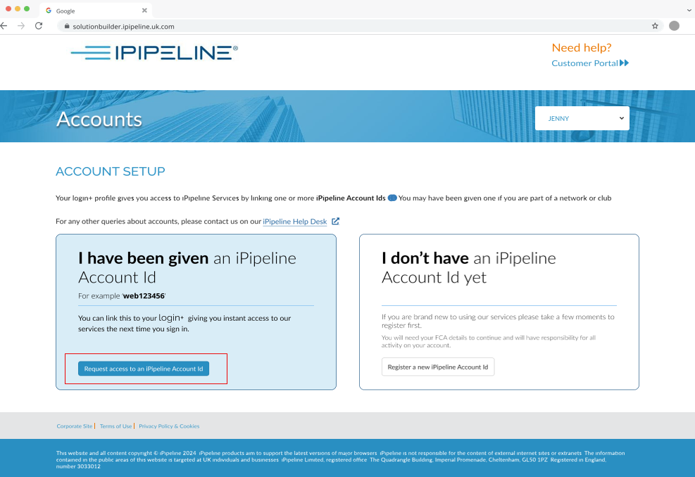
Click ‘Request Access To On iPipeline Account ID’ and enter the web number provided by your Network, Service Provider or Club and enter the Account Id provided. If you have not received an email containing your iPipeline Account ID from your Network/Service Provider yet – please contact them directly for an update.

Once you click continue, your accounts will be linked and you will now be able to select the account you wish to access by clicking continue.

If you are unable to link the accounts or you receive any error messages, please contact our Support Team via Live Chat, Email or by phone on 0345 408 4022 and we will be happy to help.